






Baldur’s Gate 3 Multiplayer: Co-op and Crossplay Guide (2026)
-
- Added crossplay (Patch 8, April 2025) and step-by-step setup
- Added Xbox Series S split-screen, Xbox Play Anywhere and the Switch 2 answer
- Removed outdated launch stats and unverified LAN and character export claims
-
Added multiplayer modes
-
Added information about multiplayer progression
-
Content updated as of the beginning of 2025

💡 Highlights
- Up to 4 players online, or 2 players in split-screen on one screen.
- Crossplay works between PC, Mac, PS5 and Xbox Series X|S.
- You need a free Larian account to play across platforms.
- The host owns the save. Guest characters are stored in that save, so guests keep their progress by returning to the same host’s campaign.
- There is no Switch or Switch 2 version.
Baldur’s Gate 3 is a one-of-a-kind RPG by Larian Studios. Since it launched on PC on August 3, 2023, it has been a critical hit and one of the most played RPGs on Steam.
If you are new to the game and wondering whether Baldur’s Gate 3 is multiplayer, here is the short answer.
Yes, Baldur’s Gate 3 is a multiplayer game that supports up to 4 players online, or 2 players in split-screen. Since Patch 8 (April 2025) you can also play across PC, Mac, PS5 and Xbox Series X|S with a Larian account.
Is Baldur’s Gate 3 Multiplayer?
Despite even BG3’s large-scale marketing, I often come across gamers asking “Is Baldur’s Gate 3 multiplayer?” YES, Baldur’s Gate 3 is indeed a multiplayer game, just like how its predecessors were but in a whole better way.
Baldur’s Gate 3 multiplayer is far smoother than the co-op in older Larian games. Read on for useful tips on multiplayer play.

Things To Know About Baldurs Gate 3 Multiplayer
The game supports up to 4 members in any online session, but you can also have less than 4 players but not more than 4. Matchmaking is lacking, so grab some GameTree friends, and use our app for voice chat. There are no real leaderboards to work towards, so just enjoy this team-based adventure.
You Don’t Have to Play Multiplayer
However, BG3 is not a multiplayer-only game. In other words, you do not necessarily have to be online in order to play this iconic role-playing title. If you are more of a lone wolf, just like me, know that Baldur’s Gate 3 gives you the option to proceed with a single-player game and have the story campaign unravel just like how you want it. In this case, you substitute Baldur’s Gate 3 multiplayer with NPC control directly. Companions are interesting and various, so there is plenty of fun to have here.
You Can Play Baldur’s Gate 3 with Friends

But even if you are a lone wolf, I would recommend that you have a separate BG3 character for online sessions. This is because Baldur’s Gate 3 multiplayer gameplay is full of exciting elements and player interaction as it takes everything the game has to offer several notches up. The game also offers split screen options for those who want to be physically close to their buddy.
There Is a Random Multiplayer
In case you don’t have any friends to play BG3 multiplayer with (and haven’t used GameTree to form a party for this adventure), there’s no need to worry. I was in those same exact shoes like you at some point back in time.
One day, while going through the settings menu, I found out that BG3 gives you the option to join other random players’ lobbies online. Moreover, you can also create your own lobby and let other lone wolves join you in your hunt to become the most powerful pack of online BG3 players.
Nevertheless, as you would have guessed already, the random party matchup in BG3 is often not what you wish for. The online community for this title is huge, but not everyone is after the same goals from their gaming session, and your squad might not be very effective. Some players might want to try makeshift PVP or competitive playstyles, while others might seek a social gaming session. If such things might spoil your experience, consider finding like-minded friends on GameTree first for this grand adventure.
Multiplayer Combat
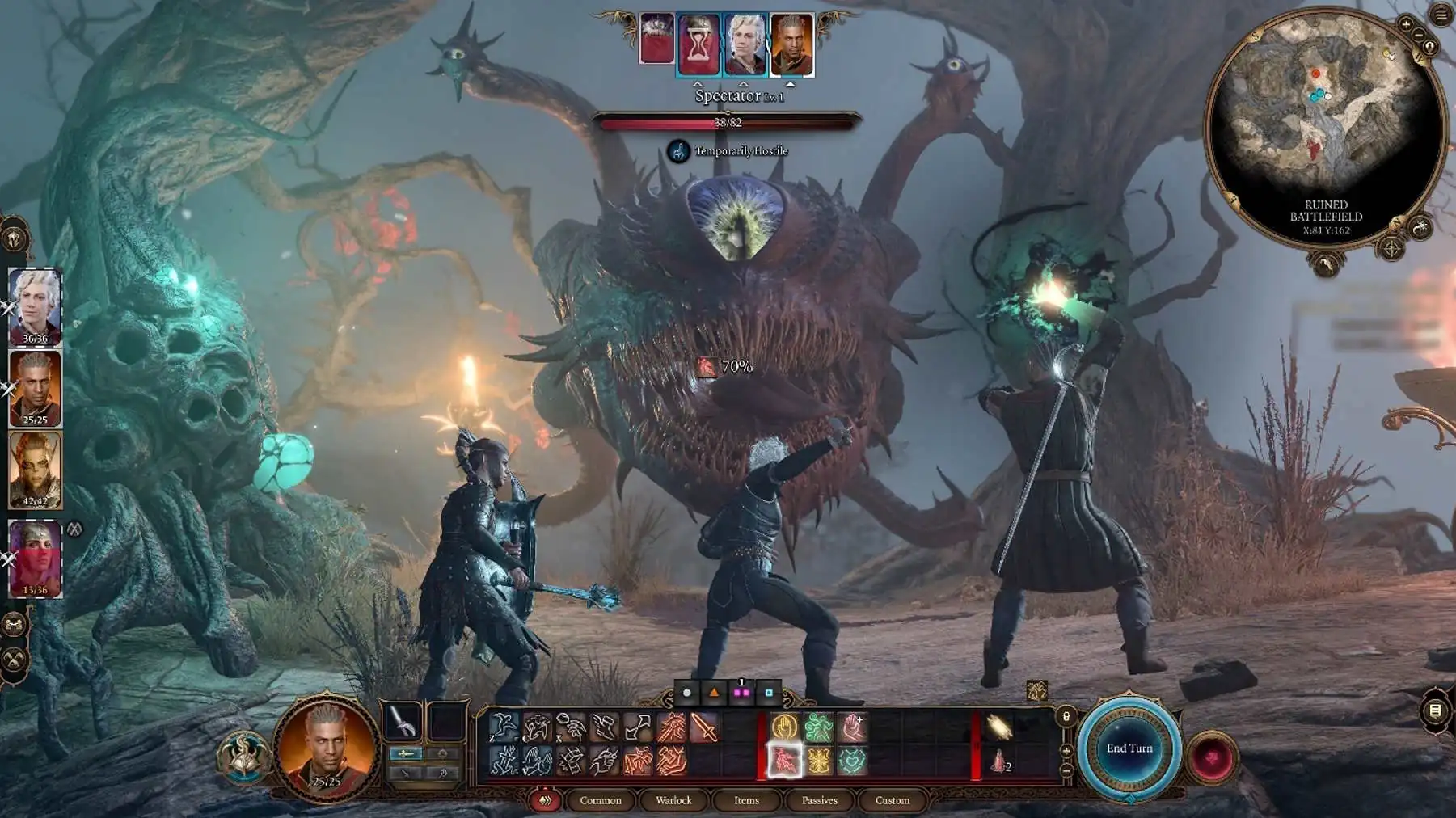
If you have played any of the Dungeon and Dragons games in the past, BG3 multiplayer combat should not give you a tough time in learning its mechanics.
In much the D&D way, Baldur’s Gate 3 multiplayer gameplay features a rich cocktail of turn-based combat, a dynamic dialogue system, tactful and strategical gameplay, as well as cooperative(or competitive) elements.
Split-Screen Option
Continuing with the flow, given the gigantic BG3 player base, Larian Studios has made Baldur’s Gate 3 support both the cross-platform cross-play as well as the split-screen options.
In other words, you are not only no longer limited to playing with players having the same game platform as you; but you also get to share your display monitor screen with another player besides you and get to enjoy Baldur’s Gate 3 multiplayer together!
For example, in spite of playing BG3 on my PC, I have 2 friends who play the game and join my online multiplayer session via their PlayStation 5 consoles. In addition, since my little brother also plays the game with me, we virtually split the TV screen in half via the game’s built-in split-screen option.
Loot In Multiplayer
Lastly, the loot mechanics in BG3 multiplayer are also very interesting. In practical terms, the loot system in BG3 is one of those core gameplay aspects that render the game so tactful.
As such, in online sessions, the items dropped and loot plundered are as much as they appear. For instance, if your 4-member party spots a legendary sword dropped from an enemy, only 1 of you can have it instead of all having 1 in their loot inventory. Then it’s up to you and your team to decide on what you make of that legendary sword, all the while remembering that it’s easier said than done!
How to Play Baldur’s Gate 3 Co-op?

-
Start a Co-op Campaign
In order to start a Co-op campaign in Baldur’s Gate 3, first run the game via the game’s launcher. Once the menu screen is loaded, head over to the Baldur’s Gate 3 “Multiplayer” section. From there, you can start the co-op campaign.
-
Invite New Players
While in the Multiplayer section interface, navigate to “Create” located at the lower part of your screen, and proceed to create a lobby before setting the permission to allow anyone to join.
However, you can also add specific friends in your lobby by sharing your Server ID with them and setting your lobby permissions to private. This way, your friends can directly jump into your lobby by selecting the “Direct Connection” button in their Multiplayer section windows. -
Team Up with Friends in Baldur’s Gate 3
Once your public lobby is ready, all you need to do is wait for players to join it. Otherwise, if you have set your lobby to private and shared your Server ID with friends, then wait for them to catch up.
Alternatively, you can set your lobby to a public mode, and then other players finding lobbies will be able to join the Baldur’s Gate 3 game of yours. -
Resume A Co-op Campaign
In case you already have an online co-op campaign ongoing, load the campaign’s gameplay files, enter the Session menu by pressing the Escape key, and start inviting players from there. Once everyone is ready, you can continue your co-op campaign from where your BG3 party last left off.
Is Baldur’s Gate 3 Crossplay?
Yes. Larian added crossplay in Patch 8 on April 15, 2025. It was the game’s last major update. Players on PC (Steam or GOG), Mac, PlayStation 5 and Xbox Series X|S can now share one party. Saves also carry across platforms. In most cases you need to own the game on each platform you use.
How to Set Up Crossplay
- Make or sign in to a Larian account and link your platform account to it.
- In the game, go to Options, then Gameplay, and turn on Allow Crossplay.
- Open your friends list from the main menu and add friends by their Larian username.
- To start fresh, go to Multiplayer, open the Crossplay tab and choose Create. Invite your friends, then launch.
- To continue a save, pick it in Load Game, tick Enable Crossplay, and invite friends from the in-game menu.
- Everyone needs the same game version. If the host uses mods, the game shows which mods each player must add or remove. Console and Mac players can only use mods marked as available on consoles and Mac.
Is BG3 on Switch 2?
No. In January 2026, Larian’s Swen Vincke said a Switch 2 port was not Larian’s call to make, so don’t expect one.
Multiplayer Modes in Baldur’s Gate 3
Baldur’s Gate 3 offers several multiplayer options that cater to different player preferences. Whether you want to adventure with friends or meet new companions online, the game provides flexible ways to experience its rich narrative and tactical combat together.
Online Co-op (Up to 4 Players)
The primary multiplayer mode allows you to play with up to three friends online. One player serves as the host, creating and maintaining the game world where others can join. The host has control over save files and game progression, while all players contribute to the adventure. Players can drop in and out of the session, though progress is only saved to the host’s game. This mode requires an internet connection and compatible platform.
Local Split-screen Co-op (2 Players)
Two players can share one screen on PC, PS5 and Xbox Series X|S. Xbox Series S got split-screen in Patch 8. The screen splits when you walk apart and joins again when you are close. Player 2 needs a controller. You can mix it with online play: two people on one couch plus friends online, up to four players in total.
Cross-save Functionality
Saves carry across PC, Mac, PS5 and Xbox Series X|S through your Larian account. You normally need to own the game on each platform you use. The exception is Xbox: since August 3, 2026, buying BG3 on Xbox also gets you the PC version through the Xbox app (Xbox Play Anywhere), and your achievements carry over.
Direct Connection
For same-platform games, the host can share a Server ID so friends can join from Multiplayer, then Direct Connection. For mixed platforms, use the Crossplay tab and your Larian friends list instead.
Each multiplayer mode maintains the core Baldur’s Gate 3 experience while adding the dynamic element of human cooperation and decision-making. The game’s systems, from dialogue choices to combat tactics, adapt seamlessly to accommodate multiple players, creating a deeply social version of the acclaimed RPG.

Multiplayer Progression & Saving
Baldur’s Gate 3’s multiplayer progression and save system is designed to balance individual player freedom with cohesive party gameplay. Understanding how saves and progression work is crucial for a smooth multiplayer experience.
Host-Based Save System
In Baldur’s Gate 3 multiplayer, the host player maintains complete control over game saves. All progress, story decisions, and world states are saved to the host’s game file. This means:
- Only the host can create save files
- All game progress is tied to the host’s game
- Guest players cannot save independently within the host’s world
This centralized approach ensures story consistency but requires coordination between players regarding when to play and how to progress.
Character Progression for Guests
When you join someone else’s game as a guest, your character is stored in the host’s save, not your own. Within that campaign, your character’s progression works like this:
- Experience, level-ups, and skill choices persist
- Equipment and inventory items remain with your character
- Character relationship developments are maintained
The Pros and Cons of Baldur’s Gate 3 Co-op
Although Baldur’s Gate 3 multiplayer is highly addicting, it is not without its flaws.
As far as the pros are concerned, Baldur’s Gate 3 multiplayer lets you make the most of what the game has to offer. You get to build real bonds with other players, pull off tactical combat tricks together, and share the story’s big moments.
However, for the cons, one can very easily argue that Baldur’s Gate 3 multiplayer ruins the game’s most dramatic moments. To be honest, this is where I agree too. For example, there was this one time that while I was having a very important chat with an NPC character, my friends were constantly roaming about, thus ruining the game’s vibe.
Also, when playing Baldur’s Gate 3 Co-op, more often than not, you will have your friends vote against how you want the game story to unfold at the time of making crucial decisions in the game. As such, this can potentially make some players feel out of control over how they want to proceed with the game’s story.
Lastly, since Baldur’s Gate 3 launched, we have seen that romance and intimacy have played a very big role in skyrocketing the game’s popularity. However, BG3 Co-op romance options are very limited and this does not sit well with some players.

Looking for People to Play BG3 With? Try GameTree
BG3 has no automatic matchmaking, only a lobby browser, and a 100-hour campaign goes best with people you trust to show up. The GameTree app matches you with players by personality and the games you like. In the GameTree LFG Discord, you can post a /lfg with the Scout bot to find a steady BG3 group.
Final Thoughts
Baldur’s Gate 3 is a state-of-the-art role-playing game by Larian Studios. It has practically taken the gaming community by storm and has given very tough competition to recent AAA titles like Armored Core VI and Starfield.
As such, BG3 is a must-play game for every RPG fan out there, but you could check our article on best PS5 multiplayer games, in case you are looking for something else. What do you think? Share your thoughts with us and let us know in the comments below!
Frequently Asked Questions
Is Baldur’s Gate 3 Multiplayer?
Yes, Baldur’s Gate 3 is a multiplayer game.
How Does BG3 Multiplayer Work?
In any Baldur's Gate 3 multiplayer game, one player hosts the campaign and invites others to join. Guests create or pick a character when they join. Everything, including the guests' characters, is stored in the host's save file, and only the host can save. Once everyone is in, you explore, talk, fight and cast spells together, either side by side or split up across the map.
How to Team Up with Friends in Baldur’s Gate 3?
Start or join a game from the Multiplayer menu. Friends on the same platform can join your lobby or use your Server ID. To play across PC, Mac, PS5 and Xbox, link a Larian account, turn on Allow Crossplay, add friends by Larian username and use the Crossplay tab.
How do I Find People to Play Baldur’s Gate 3 Multiplayer With?
You can find people to play Baldur’s Gate 3 multiplayer with by using the GameTree app. It is a central hub for like-minded players to find friends and stay connected with each other.
How Many Players Can Play Baldur’s Gate 3?
Up to four players can play together online. Two players can also share one screen in split-screen.
Can You Play Baldur’s Gate 3 with Friends?
Yes, you can play Baldur’s Gate 3 with friends via the game’s multiplayer menu.
Is Baldur’s Gate 3 Crossplay?
Yes, since Patch 8 in April 2025. It works across PC, Mac, PS5 and Xbox Series X|S. You need a Larian account.
Do Guests Keep Their Progress in BG3 Co-op?
Only inside the host's campaign. Guest characters, with their levels, gear and relationships, are stored in the host's save, so guests continue by rejoining that host's game. You cannot carry a guest character into your own single-player save.