

Check for your issue below, then scroll down for instructions.
- Do you share a server with Scout? If not, join the GameTree server here!
- Not getting any messages from Scout? Enable bot messages from Scout
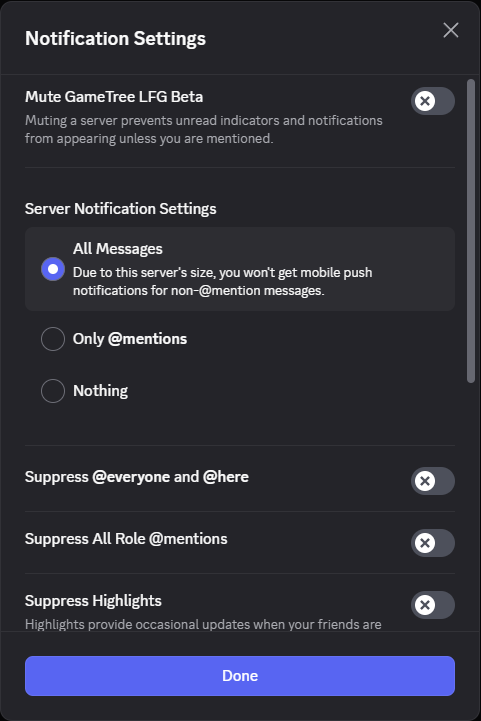
- Can’t find your LFG sessions? Enable GameTree server notifications
- Not getting LFG prompts when you launch a game? Enable Discord Activity sharing
Enable bot messages from Scout
Scout sends you:
- LFG prompts when you launch a game
- LFG invites and scheduled LFG reminders
- Session summaries
You can test this by writing “/sessions” anywhere the bot lives. If you don’t get a reply, then make sure you didn’t block Scout. Check Discord > Friends > Blocked
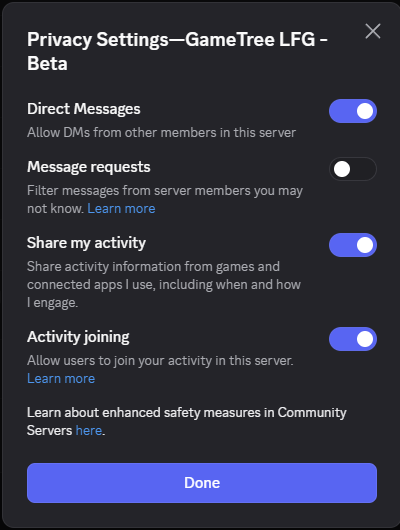
If you’re still not receiving bot messages, ensure Direct Messages from server members is enabled. Right click the GameTree server > Privacy Settings > Direct Messages = Enabled
Enable GameTree Server Notifications

Enable Discord Activity sharing
If you are not getting prompts from Scout to create an LFG, then check that you’re sharing activity with the GameTree server. Click the gear icon in the bottom left > Activity Privacy > Share my activity = enabled and shared with the GameTree LFG server.
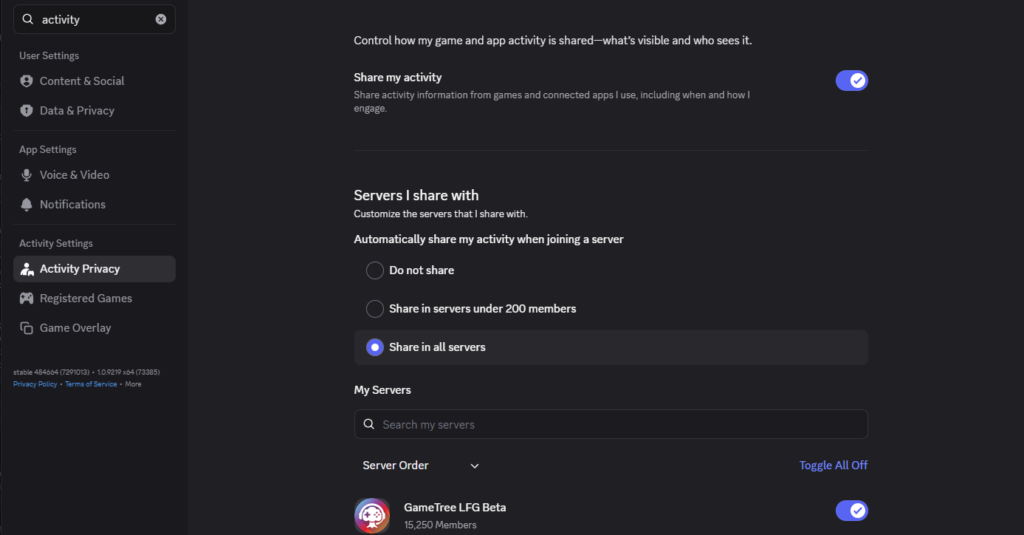
You can alternatively right click the GameTree server > Privacy settings > Share my activity = Enabled