

Scout is GameTree’s Discord LFG (Looking For Group) bot.
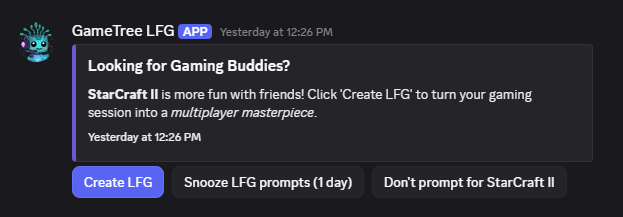
With this magic Create LFG button, you can launch any game and instantly form a group with relevant friends, communities, and compatible players. Scout automatically handles invites, a private chat, and voice calls so you can start playing instead of organizing and spamming.
Step 1: Sign Up For GameTree
Why do you need a GameTree account?
- the personality test enables Scout to curate players you’ll vibe with (and you’ll learn a lot about yourself!)
- you get a beautiful universal gamer profile that showcases who you are with your LFG’s
- the matchmaking tool can help you find your most compatible LFG Friends-in-waiting from over 1.5 million gamers
By March, Scout will also be usable without an account, and available for private servers to help communities coordinate play. Request early access.
Step 2: Join the GameTree Discord Server
Joining the GameTree server gives you access to Scout. It’s also the host for your private group LFG text and voice channels. You can interact with Scout in his Direct Message chat, or in any server he’s installed. All Scout’s commands use a “/” before them.
When cross-server bot-usage is ready, LFG’s will be hosted locally and membership in the GameTree server will no longer be required.
Step 3: Fill Your LFG Friends Roster
Scout shines when you build a network of GameTree LFG Friends. You’ll automatically send and receive invites with players who are online and playing the same game – making coordination effortless, without constant tagging or manual messages. This is especially true while the bot is new and the player population is small. Adding people over time will help build and sustain your connections so you can have awesome friends every time you play.
- Link Steam in the GameTree app to automatically import all of your Steam friends. This is a great way to resurface forgotten connections who were meaningful at one time, but you would otherwise never play with again. This also keeps your games library up-to-date! Linking can be done during GameTree app sign up, or at Edit profile > Networks > Steam
- Browse GameTree’s Matchmaking Tool to discover players you’re genuinely compatible with based on your games, playstyle, personality, and values. Explore curated profiles, send friend requests, and start conversations with players who are likely to become actual teammates, not one-off queue partners.
Pro tip: A thoughtful message beats “hi” every time. And the more complete your profile is, the better your matches will be. - Add Discord friends you want to play with via Scout. Anywhere the bot lives just type “/friends” then click “add” and write their Discord name or handle. Having a good LFG Friends roster is important, so it’s worth scrolling your chats list and adding all your friends. Unfortunately, Discord doesn’t allow any easier way to add all your Discord friends at once.
Because GameTree accounts are required until March, you need to poke your gaming buddies to sign up, and also to join any server where the bot lives. - Get Scout installed in your servers to make playing with those friends/communities easy. Available in March, just LFG from that server to matchmake within that community. It’s still good to add your favorite people as LFG Friends as well.
- Join an LFG community. This also won’t be available until later, but we intend to create a directory of servers with GameTree LFG enabled, as well as a discovery tool for personalized community recommendations! The GameTree Discord server exists, but it’s primarily for hosting LFG’s outside of community homes.
Step 4: LFG Play Time!
Whenever you launch a multiplayer game, you’ll receive a Discord message from Scout with a list of LFG’s with your most compatible players, as well as a “Create LFG” button to form your own group.
You can alternatively browse LFG’s in server #lfg channels, type “/sessions” for a curated menu of LFG’s (documentation), or “/lfg” to create your own with more control options than the Create LFG button, such as adding a description or scheduling a session in advance.
In an LFG, the bot automatically invites your relevant friends and compatible players, or server members if made in a private server. Click here to learn more about the incredible LFG process.
If you are having trouble with Scout, check your Discord settings to ensure you have activity/game detection and direct messages from the Scout bot enabled.
While the bot is new, it’s best to schedule LFG’s in advance to ensure players have plenty of time to discover and RSVP to your LFG. The bot will invite players over time (with reminders), create a private group chat, and at start time – provide a voice call link.
Spam reduction: After a session, LFG invites are automatically deleted, as are server posts and lingering voice + chat channels. Scout is highly customizable, “/preferences” allows you to control the invites and notifications you receive regarding particular games, players, servers, and playtimes.
Lastly, “/help” for a reminder of the neat stuff you can do with Scout.
Missing functionality you need?
Scout is still its infant stages. We have ambitious plans to add deeper matchmaking filters, cross-server LFG controls, league/tournament organization, playtime availability schedules, advanced player profiles, gamification, and more. Feel free to shoot us a message if you have any questions or requests. Click here to request private server beta access.
There’s no time like the present to try your first LFG. Start by downloading the GameTree app.
Good luck, have fun!