






Stardew Valley Multiplayer: Co-op Guide (Up to 8 Players)
-
- Corrected the player count: up to 8 on PC and Switch 2, 4 on other consoles.
- Added the Switch 2 Edition and its 4-player split-screen and GameShare.
- Fixed mobile co-op info: mobile players can join PC farms by IP.
- Updated Xbox subscription names and added 1.7 news.

Stardew Valley is an awesome life simulator where you get to run your own farm. There aren’t any strict tasks to follow, which makes it feel like a sandbox game. You can dive into all kinds of activities, gather resources, and build up your farm however you like. One of the coolest features is multiplayer in Stardew Valley, which lets you hang out and have fun with friends. Keep reading to find out all the details about playing together in Stardew Valley!
Yes. Stardew Valley has online co-op for up to 8 players on PC and on the Switch 2 Edition, and up to 4 on PlayStation, Xbox and the original Switch. You can also play split-screen on one screen, or use a hidden co-op mode on mobile. There is no crossplay between PC and consoles.
💡 Highlights:
- Online co-op supports up to 8 players on PC and Switch 2, and up to 4 on PlayStation, Xbox and the original Switch.
- Split-screen works for up to 4 players on PC, PlayStation, Xbox and Switch 2, and 2 players on the original Switch.
- There is no crossplay between PC and consoles. Steam and GOG players can play together.
- Mobile has a hidden co-op mode that connects by IP address. Mobile players can join a PC farm on the same version.
- The host keeps the save file. Others can’t play on that farm while the host is offline.
- You can start a new co-op farm or open a single-player save to friends.

Is Stardew Valley Multiplayer?
Yes. Stardew Valley supports co-op for up to 8 players on PC and the Switch 2 Edition, and up to 4 players on PlayStation, Xbox and the original Switch. You can play online, over a local network, by direct IP on PC, or in split-screen on one device. Update 1.6 (March 2024) raised the PC limit from 4 to 8.
How Does It Work?
The player who created the world is the main host, and other players join them. The host stores the game world save file and has access to their world both in single-player and online modes. If the host is offline or the farm is not open for visiting, other players will not be able to access the world or their characters in that world.
Between Which Platforms Is It Available?
Online co-op works on PC, PlayStation, Xbox, Nintendo Switch and Nintendo Switch 2. Each platform plays only with itself. PC players can’t join console farms, and PlayStation, Xbox and Switch players can’t join each other. On PC, Steam and GOG players can play together.
Note:
Mobile (Android and iOS) has a hidden co-op mode. It connects by IP address only. Mobile players can join a farm hosted on PC if both run the same game version. The Apple Arcade version has no multiplayer.
Stardew Valley on Switch 2
The Nintendo Switch 2 Edition is a free upgrade for Switch owners. It launched on December 25, 2025, in North America. It raises online co-op to 8 players and split-screen to 4 players. It also adds mouse controls and GameShare, which lets up to 3 friends join your farm from one copy.
How To Play Multiplayer In Stardew Valley

Players can create a world specifically for Stardew Valley multiplayer play or switch their single-player world to make it open to other players at any time. Here’s more info on all the available options:
How To Host The Multiplayer World
- Select Co-op on the title screen.
- Select the Create a Game tab.
- Click Create a New Farm.
- Don’t forget to add one cabin for each person who joins the game.
- Set the profit margin amount right away. You can decide to split the money between players or have your own wallet.
- Now you’re ready for adventures and can play Stardew Valley multiplayer!
How To Start A Split-Screen Mode
- Create or load a usual game save.
- Add one cabin for each person who joins the game.
- Open the in-game menu and choose the Options tab.
- Find the Multiplayer section and choose Start Local Co-op.
- The invited player should press Start on their connected controller.
How To Invite Friends To a Single-player World
- Add one cabin for each person who will join the game.
- Save and go back to the title screen.
- Open the save file via Co-op instead of Load to allow other players to enter.
How To Join Stardew Valley Co-Op
Your friends’ multiplayer farms will appear in Stardew Valley on the co-op join screen. There are also some nuances depending on the platform you are using:
- PC: Join a Steam friend’s farm from the co-op screen, enter an invite code from Steam or GOG Galaxy, or connect by IP address.
- PlayStation: You need PlayStation Plus.
- Xbox: You need Game Pass Essential, Premium or Ultimate. (Game Pass Core was renamed Game Pass Essential in October 2025.)
- Nintendo Switch and Switch 2: Online play needs Nintendo Switch Online. Players in the same room can use local wireless without a subscription.
- Split-screen: up to 4 players on PC, PlayStation, Xbox and Switch 2, and up to 2 on the original Switch.
How To Access Stardew Valley’s Hidden Mobile Multiplayer Mode
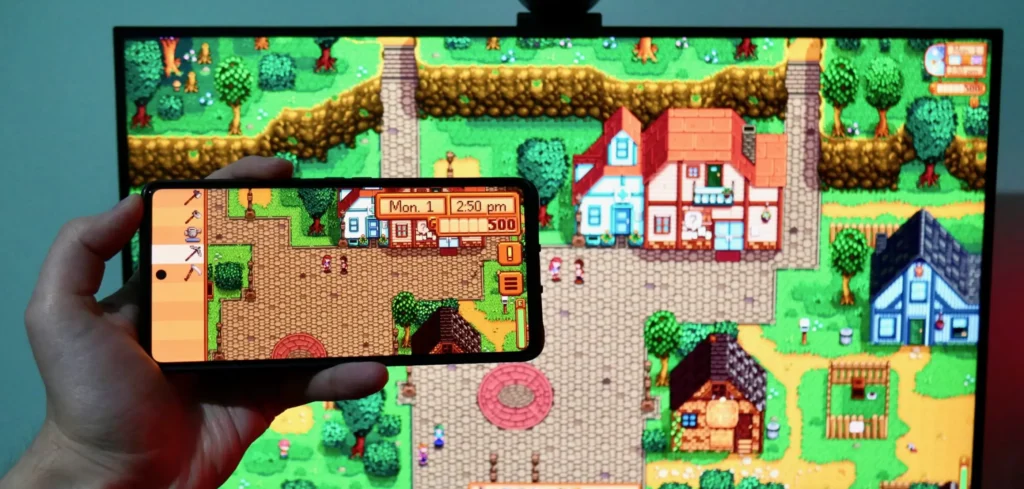
Since the mobile 1.6 update (November 2024), Android and iOS have a hidden co-op mode. You can only connect by IP address. It works best on the same Wi-Fi network. To play over the internet, the host may need to forward UDP port 24642. The Apple Arcade version does not support it.
To activate Stardew Valley co-op on a mobile device, you need to do the following:
- Launch Stardew Valley.
- On the start screen, on the sign with the inscription “Stardew Valley,” you will see leaves in four places: near the letters S left, W up, V down, and Y right.
- You need to make the following combination by tapping on the leaves next to these letters– ↑ ↑ ↓ ↓ ← → ← →
- After that, click on the “?” icon in the lower right corner and restart the application.
- If you did everything correctly, when you enter the game, you will see a new option, Co-op, in the main menu. Now, you are ready to create your own world and be a host or join a friend’s farm by IP!
Stardew Valley’s Local Co-op and Split Screen
In Stardew Valley multiplayer, players can do the same things they can do in single-player, but the gameplay is more dynamic and exciting. Here are some of the top things I like doing with my friends in Stardew Valley co-op mode:
- They work on the same farm, helping each other with daily tasks such as planting, watering, and harvesting crops, as well as helping to build and upgrade buildings.
- Manage the barnyard together, care for animals, feed them, collect resources, and go fishing.
- Explore mines together, fight monsters, and collect valuable resources. Boss battles are more intense in Stardew Valley co-op, as they require coordination.
- Take part in various festivals, often requiring a team to complete tasks.
- Complete joint quests or tasks from in-game characters, helping each other solve puzzles and exchanging resources.
- Develop relationships with the game’s characters by completing their errands.
Note:
Split-screen mode is another option in Stardew Valley. It allows all players on the same device to play together, making the gameplay even more exciting.
Here’s what you need to know about split-screen mode:
- Players can be on the same screen but move and work on separate farm parts or perform other activities.
- Each player has their own inventory panel and can select tasks or resources to work on without disturbing other players.
Multiplayer Features
Overall, Stardew Valley multiplayer is almost no different from the single-player game, but there are some unique features:
- Four Corners Farm. This map is specifically designed for multiplayer but can also be played solo. The farm is divided into four square areas of roughly equal size.
- When creating a new multiplayer game, you can choose the profit margin size: 25%, 50%, 75%, 100%. Choosing a lower margin helps balance the economy in Stardew Valley multiplayer mode by reducing the gold received when selling items and crops.
- Players can get married, just like in the single-player game.
- Some decisions are made jointly by all players: when to go to bed, when to start a party, how to divide the budget, etc.
- Players may have a shared money account or split it.
- Each player can have different daily luck.
Gameplay Tips For Multiplayer
- If you’re looking to play with friends, the Four Corners farm is the way to go since it’s made for Stardew Valley multiplayer. Each player gets their own section of the farm, rather than everyone sharing the same space. The farm is split into four areas, with little hills marking where each player’s plot starts and ends.
- Be sure to reduce the profit margin. Having too many people can make it super easy to rake in the cash, which could mess with the game’s economy.
- To make your farm work efficiently, distribute responsibilities and tasks among your team. A clearly defined goal will help you focus on your tasks; otherwise, you will inevitably distract each other and interfere.
- Create one common chest where all players will put resources for common use. And don’t forget to add items to the common chest before you end your game session! This way, other players will have access to the resources that you mined while you are offline.
Is Stardew Valley 1.7 Coming?
Yes. Creator Eric Barone confirmed update 1.7 in August 2025, but there is no release date. So far he has confirmed that Clint and Sandy will become romance options. No multiplayer changes have been announced. His next game, Haunted Chocolatier, also has no release date.
Looking For Stardew Valley Team? Try GameTree
Want friends for a shared farm? The GameTree app matches you with players by personality and the games you like. You can also join the GameTree LFG Discord, with about 28,500 members, at discord.gg/6duvwHx2Q2, and use the Scout bot’s /lfg command to find farmhands. Say which platform you play on, since there is no crossplay.
Final Thoughts
Stardew Valley is a very addictive game that can easily entertain you for hours. Thanks to co-op and an easy way to organize a joint farm, there is a risk of getting lost in it with friends for a long time, and the gameplay will become even more exciting. In this article, I described how to create a multiplayer world in Stardew Valley and how to connect to an existing world. I hope you will not have problems with the connection and that you enjoy this sandbox as much as I do! If you want more co-op games, read our guide to Cult of the Lamb co-op, look at games like Terraria, or browse the best multiplayer Switch games.
Frequently Asked Questions
Yes. Up to 8 players can share a farm on PC and Switch 2, and up to 4 on PlayStation, Xbox and the original Switch.
Yes, if you play on different devices. Split-screen on one device needs only one copy. On Switch 2, GameShare lets friends join from your copy.
Check that you both run the same game version, that the host started the farm in Co-op mode, and that there is an empty cabin. Also remember there is no crossplay, so you must be on the same platform. Mobile players can only join PC farms by IP.
No. PC, PlayStation, Xbox and Switch players can only play with the same platform. Steam and GOG players can play together, and mobile players can join PC farms by IP.